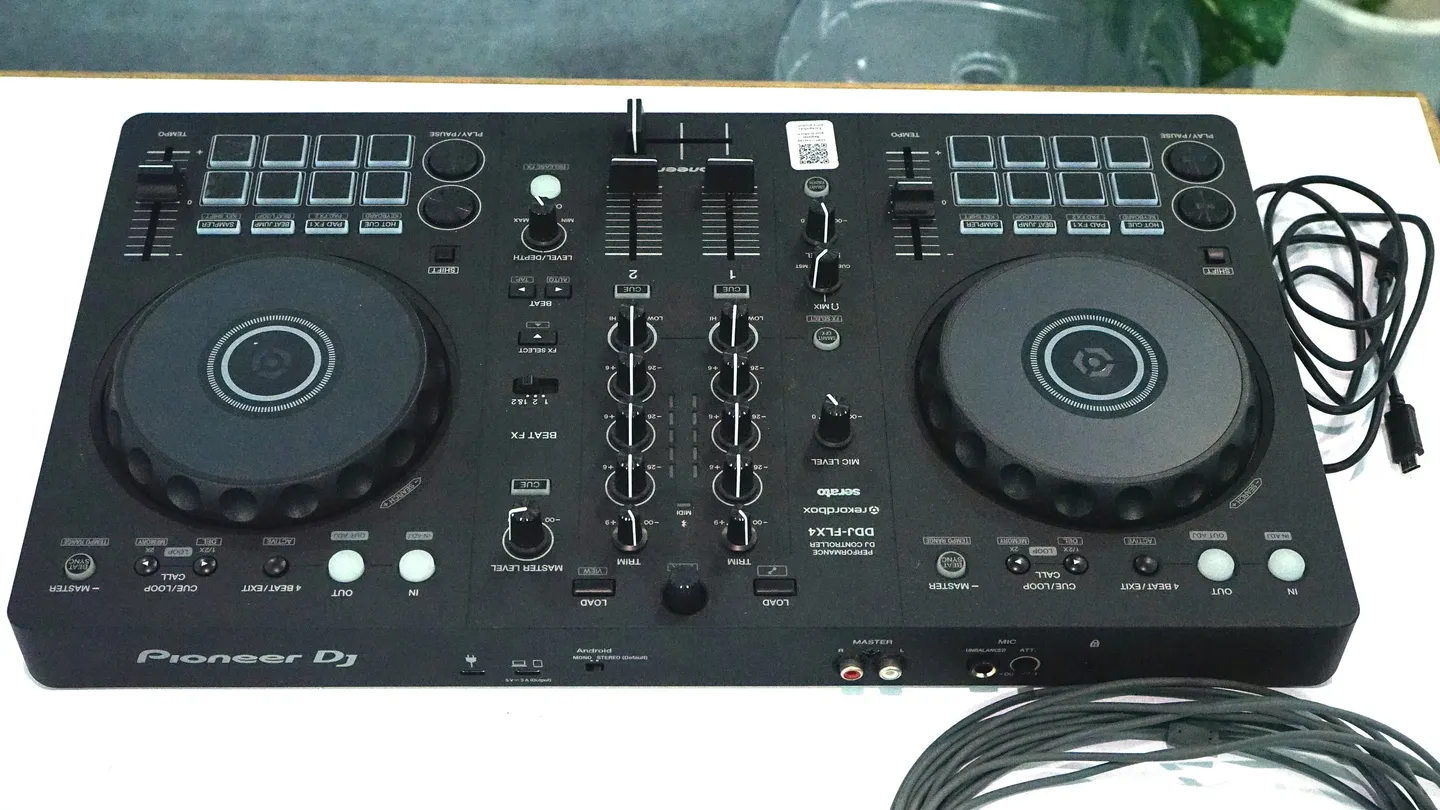
The Pioneer DJ DDJ-FLX4 has more on its Shift button than the labels show. A Digital DJ Tips guide, last updated November 4, 2026, runs through five hidden shortcuts plus a bonus, all tested in rekordbox. Most of them keep your hands on the controller and off the laptop.
The DDJ-FLX4 Shift tricks, one by one
- Search with the jog wheel: hold Shift and turn the top of the jog wheel. Slow turns move a little at a time, and a fast spin reaches the end of the track in about half a second.
- Full-screen library: hold Shift and press Load on the right deck. Browse and load with the rotary knob, then press again to switch back.
- Tempo range: hold Shift and tap Beat Sync, which is labelled Tempo Range. The fader starts at about plus or minus 6%, and each press widens it.
- Waveform zoom: hold Shift and turn the middle rotary knob. The default shows about two bars ahead and behind, and both decks zoom together.
- Fader Start: set a cue point, hold either Shift button and push the channel fader up. The track starts from the cue. Pull the fader down and it returns to the cue point.
- Bonus, back to the start: hold Shift and tap Cue to jump to the beginning of the track.
One tempo range setting to watch
The fourth press of Tempo Range is so wide that pulling the tempo fader all the way down stops the track. That is useful for a turntable-style slowdown and a problem if you bump the fader mid-mix. A fifth press puts it back to plus or minus 6%, so check where you are before a set.
Set the crossfader for Fader Start
Digital DJ Tips pairs Fader Start with a crossfader change. In rekordbox, go to Preferences > Controller > Mixer and choose the sharpest crossfader curve. The channel fader then gives you a smooth start with volume control, while the crossfader brings the track in at full volume, which helps with stutter effects. Do that at home, not at soundcheck.
What else to know about the DDJ-FLX4
Older reviews disagree on a few specs, so these come from Pioneer DJ's product page:
- Software: rekordbox, djay, Serato DJ Lite and Traktor Play are free options. Serato DJ Pro and djay Pro are paid upgrades.
- Bluetooth: for phones running rekordbox for iOS or Android. Pioneer does not list Bluetooth for a PC or Mac, and mic audio only mixes in when no Bluetooth device is connected.
- Connections: one USB-C port, RCA master outputs, a 1/4-inch mic input and a headphone output. There is no booth output listed, so plan around the RCA outs at a venue.
- Smart Fader: adjusts volume, bass and BPM automatically as you move the faders. It has its own button, so make sure it is off if you want to mix by hand.
Pioneer lists firmware version 1.07, released September 4, 2025, as the latest. Run the update before you rely on any of this at a gig.
Related: Serato DJ Pro 5.0 Is Out of Beta · HDJ-F9 Wireless DJ Headphones
Questions people ask
Do these DDJ-FLX4 Shift tricks work in Serato?
The Digital DJ Tips list covers rekordbox. The site has a separate Serato version, so check that one if you run Serato.
How do you start a track with the channel fader on the DDJ-FLX4?
Set a cue point, hold Shift and push the channel fader up. Pulling the fader down returns the track to the cue point.
Does the DDJ-FLX4 have Bluetooth?
Yes, for phones running rekordbox for iOS or Android, according to Pioneer DJ. Pioneer does not list Bluetooth connections to a PC or Mac.
What software works with the DDJ-FLX4?
Pioneer DJ lists rekordbox, djay, Serato DJ Lite and Traktor Play as free options, with Serato DJ Pro and djay Pro as paid upgrades.
Sources
Pioneer DJ: DDJ-FLX4 product page
VirtualDJ: VirtualDJ - DDJ-FLX4 - Controls
Digital DJ Tips: DDJ-FLX4: 5 Hidden Shift Button Tricks
MusicRadar: "A strong contender for the best beginner's DJ controller on the market right now": Pioneer DDJ-FLX4 review
Mixdown Magazine: Review: Pioneer DJ DDJ-FLX4 2-Channel DJ Controller
Photo: Pioneer DDJ-FLX4 at Taipei Media School booth 20250810 by Solomon203, Wikimedia Commons, CC BY-SA 4.0